Request a demo

For driving school owners

Software for driving schools

Your website and student enrollment platform, built for driving schools, not adapted to them. Your payment accounts, domain and texting number stay in your school's name.

  • Runs a working Columbus driving school today
  • No per-student, per-contact or per-user fees
  • Your domain, payments and texting number stay yours

Product tour

See the whole system

Real screens from the platform as it runs a Columbus driving school today. Student and instructor names, emails and phone numbers are replaced with fictional ones.

Dashboard 1 / 9

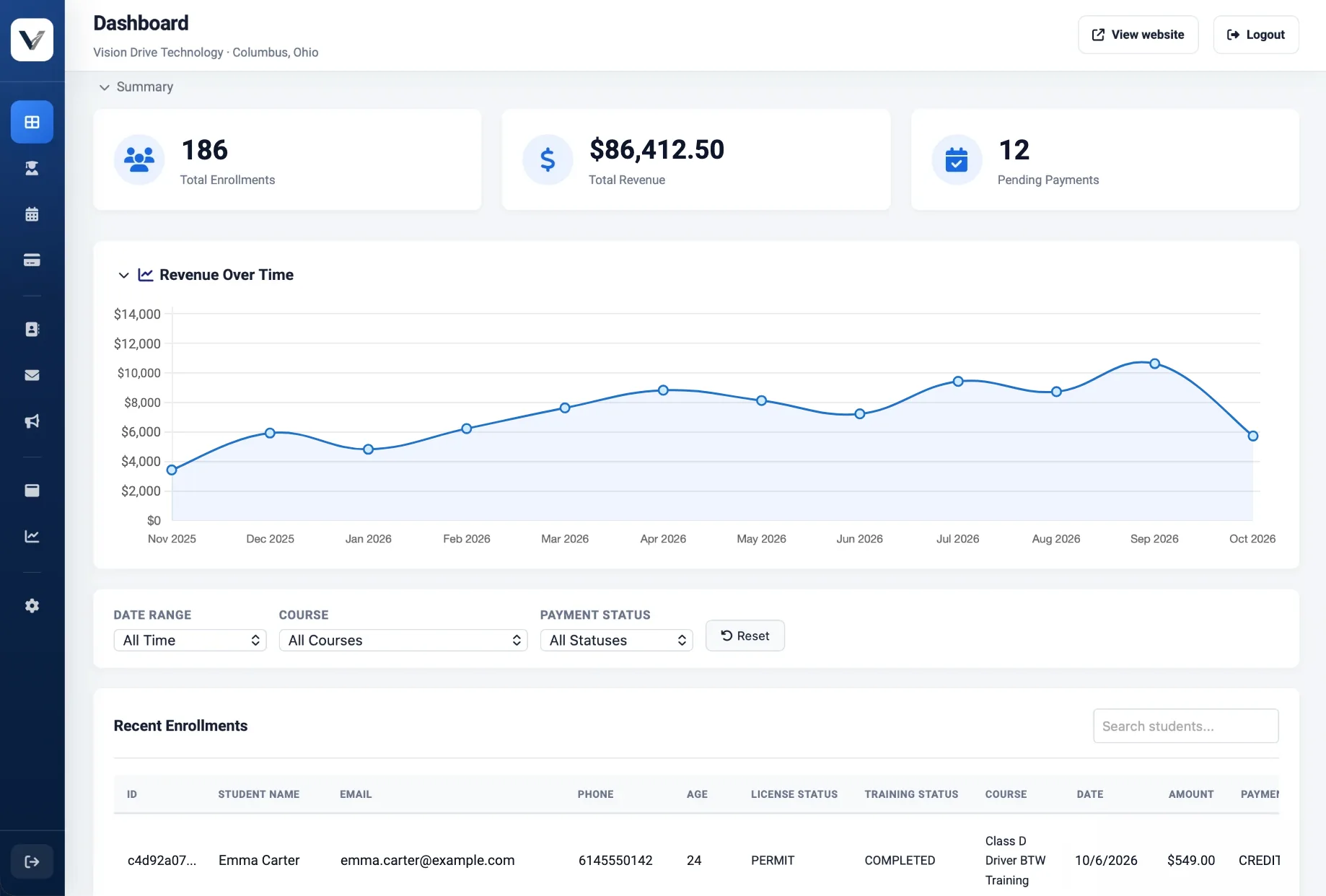
The whole school at a glance

Enrollments, revenue and pending payments the moment you sign in.

Admin dashboard with total enrollments, revenue collected, pending payments, a revenue-by-month chart and a recent enrollment
  1. Headline numbers

    Total enrollments, revenue collected and payments still pending.

  2. Revenue by month

    Twelve months of revenue, so a slow season shows up early.

  3. Filters

    Narrow everything by date range, course or payment status.

  4. Every enrollment

    Each record shows the course, licence and training status, and the amount paid.

Students 2 / 9

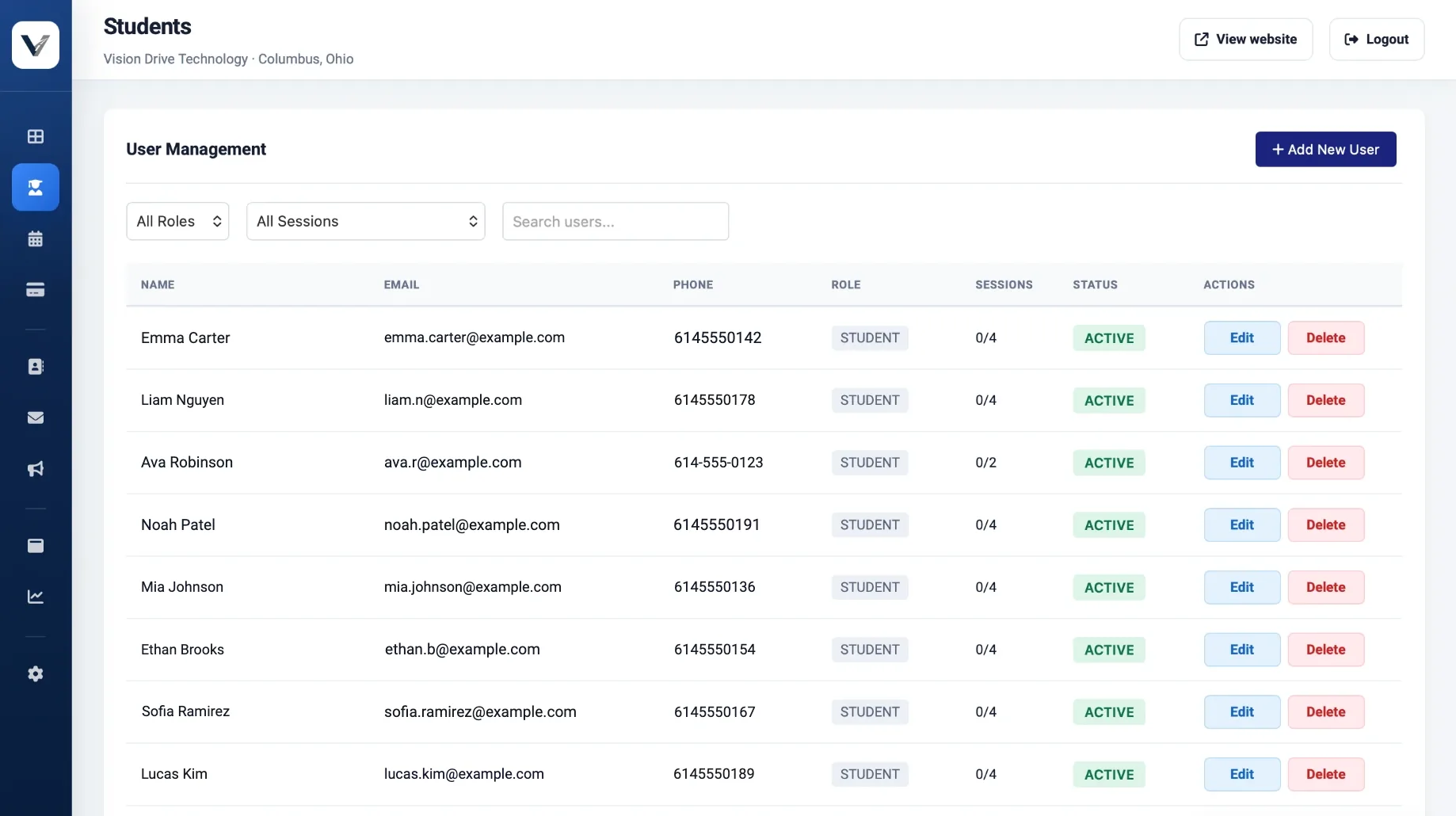
Every student and staff account

Students, instructors and admins in one list, with lesson progress beside each name.

Student list with names, emails, phone numbers, sessions completed and account status
  1. Search and filter

    Find anyone by name, role or how many sessions they have left.

  2. Session progress

    Behind-the-wheel sessions completed against the number required.

  3. No per-user fees

    Add students, instructors and admins without the price moving.

Schedule 3 / 9

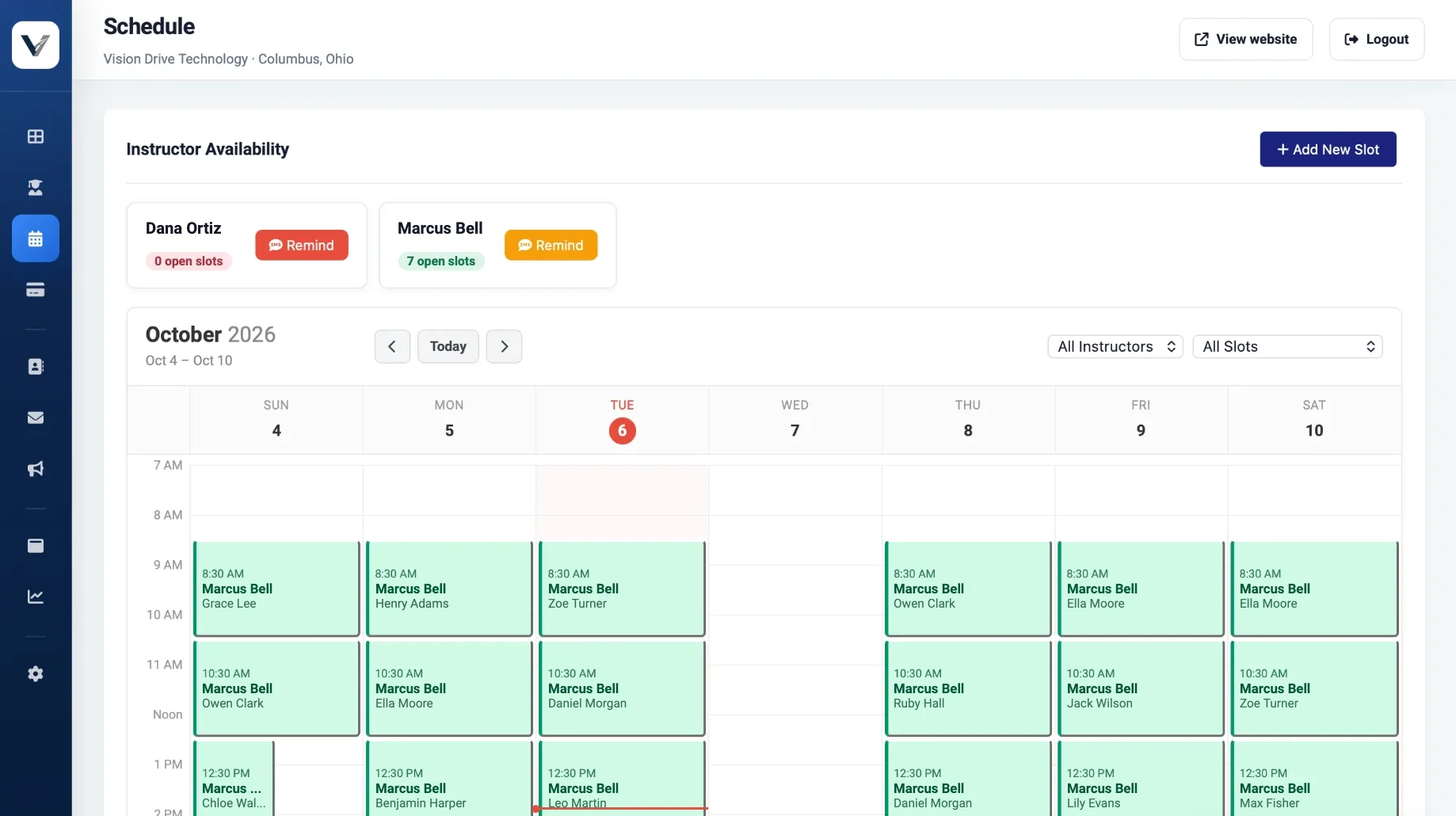
Instructor calendars

Every instructor’s booked and open slots in one week view.

Weekly instructor calendar with booked driving lessons and open-slot counts per instructor
  1. Availability check

    Open slots per instructor, with a one-tap text reminder to add more.

  2. Booked lessons

    Each slot shows the instructor and the student booked into it.

  3. Filter the week

    Show one instructor, or only open or booked slots.

  4. Add availability

    Publish new slots that students can book from their account.

Payments 4 / 9

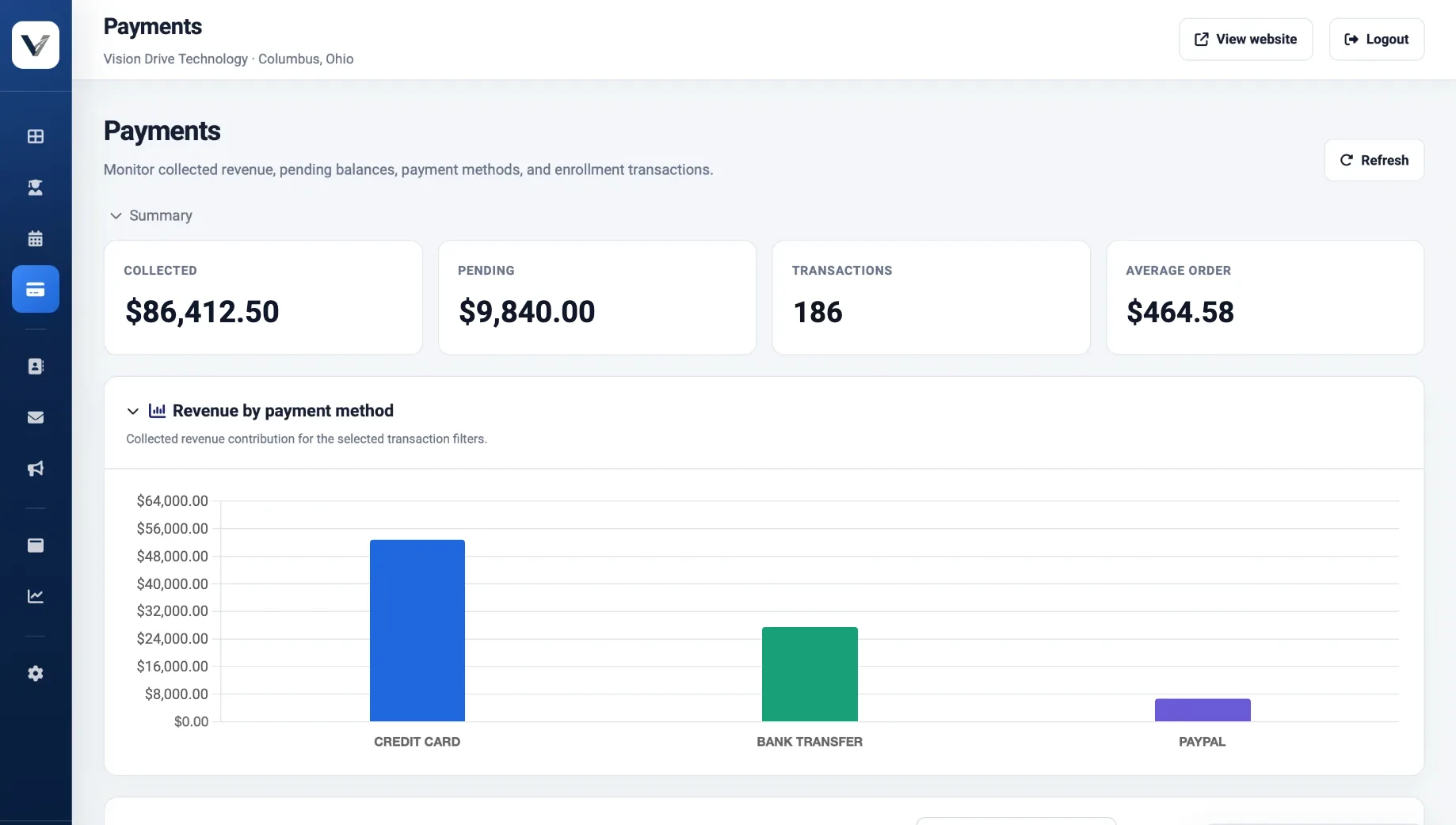
Payments and balances

What has been collected, what is still owed, and how students paid.

Payments page with collected and pending totals and revenue broken down by card, bank transfer and PayPal
  1. Collected and pending

    Totals, transaction count and average order in one row.

  2. By payment method

    Card, bank transfer and PayPal revenue side by side.

  3. Bank debit

    Bank debit (ACH) costs far less than a card on a typical package.

Texts & calls 5 / 9

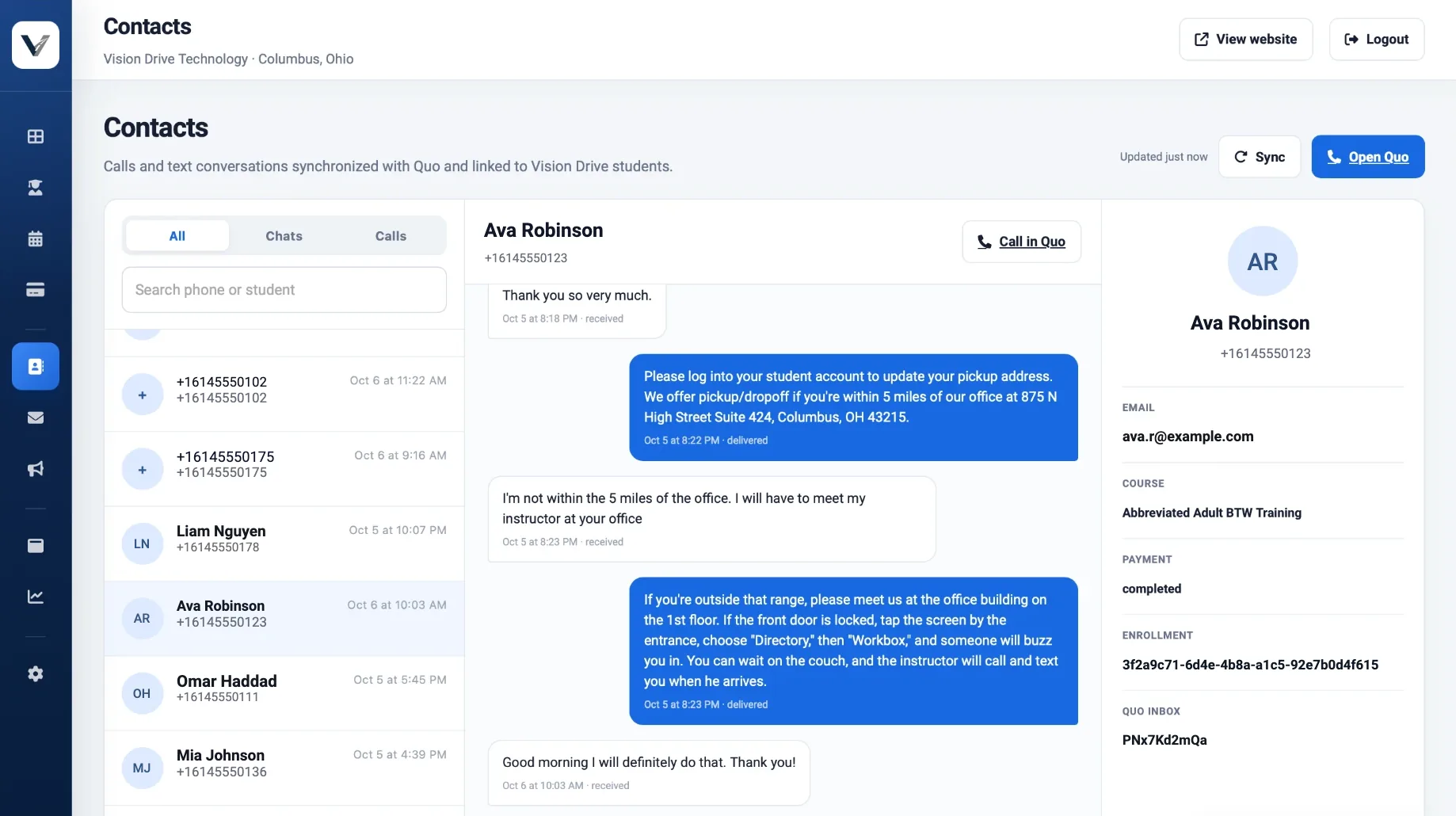
Texts and calls, linked to students

Conversations from your school’s phone number, matched to the student record.

Text conversation with a student next to their course, payment status and enrollment
  1. Synced conversations

    Calls and texts from your school’s number, listed by student.

  2. Reply from the portal

    Answer a text without picking up the office phone.

  3. Call in one click

    Start a call straight from the conversation.

  4. Context beside the chat

    Course, payment status and enrollment next to every conversation.

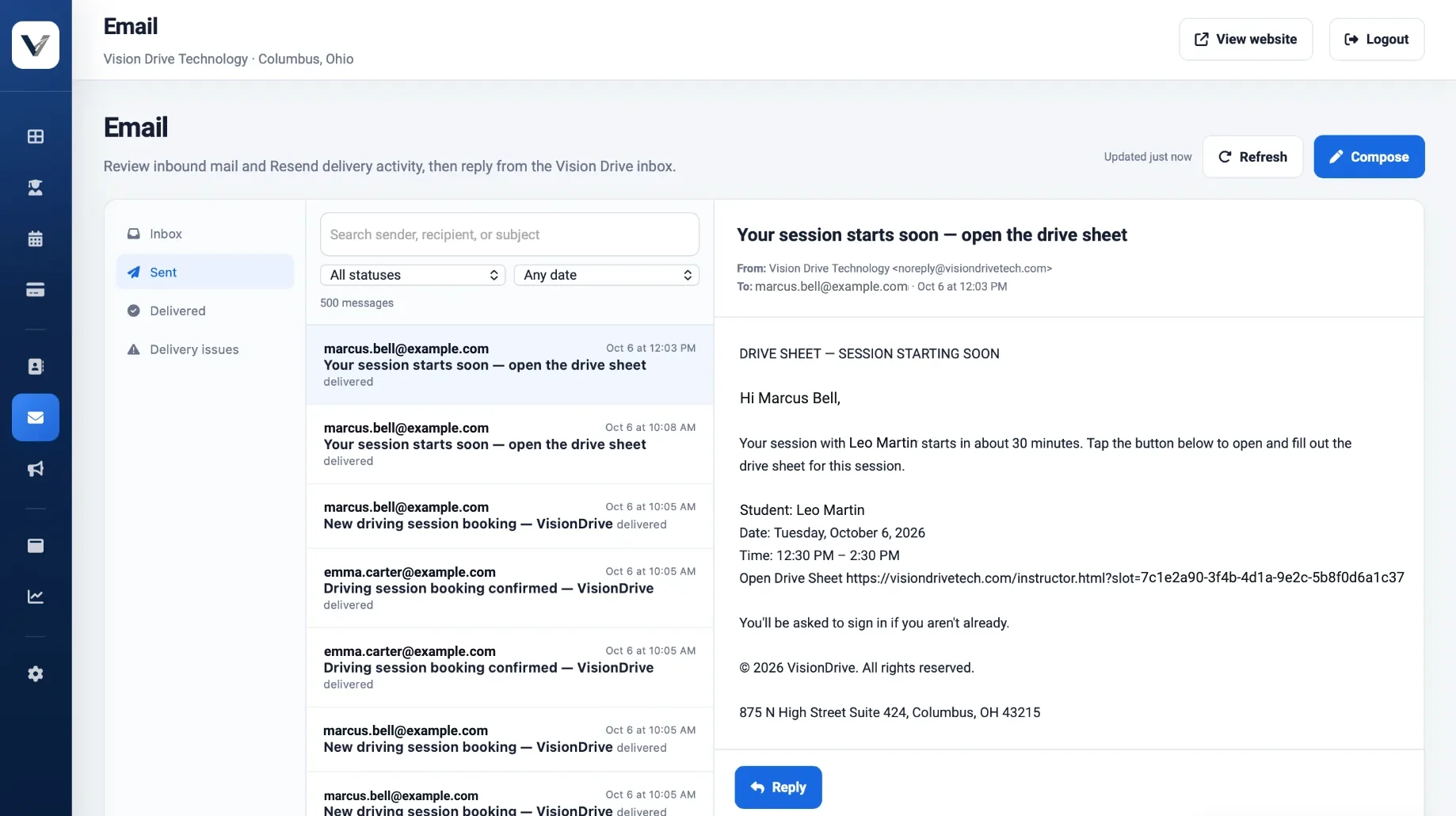
Email 6 / 9

Email with delivery tracking

Inbound mail, automatic notices and their delivery status in one inbox.

Email inbox listing sent booking confirmations and an automatic drive-sheet reminder to an instructor
  1. Sent and delivered

    Every message the school sends, with its delivery status.

  2. Automatic reminders

    Booking confirmations, and a drive-sheet link to the instructor 30 minutes before each lesson.

  3. Delivery issues

    Bounced or failed messages collected in one place.

  4. Reply as the school

    Compose and reply from your school’s address.

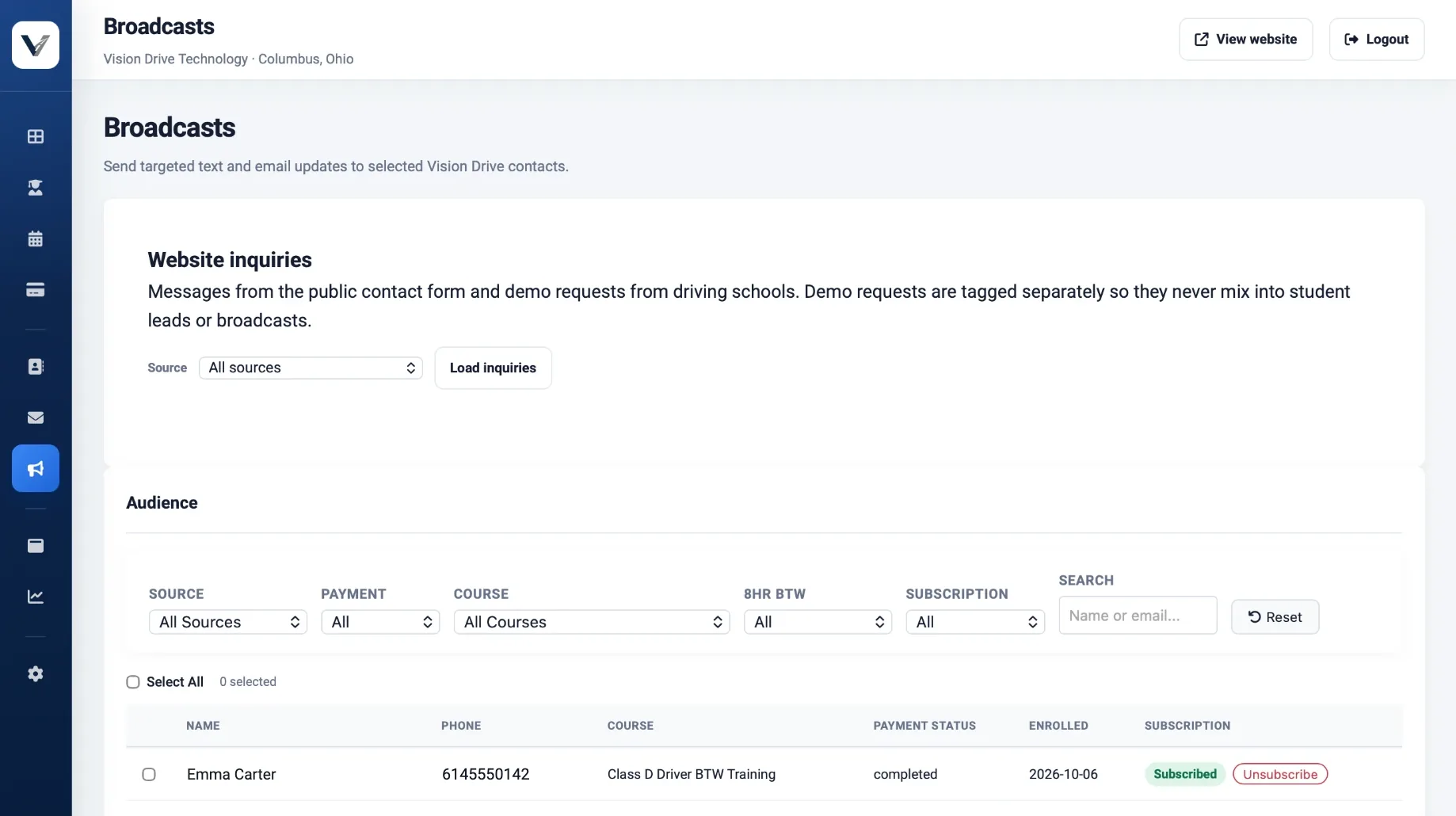
Broadcasts 7 / 9

Targeted texts and emails

Message exactly the students who need it, and nobody who opted out.

Broadcast audience builder with filters by source, payment, course, behind-the-wheel progress and subscription
  1. Website inquiries

    Contact-form messages and school demo requests, kept apart from student leads.

  2. Build an audience

    Filter by source, payment, course, behind-the-wheel progress and subscription.

  3. Opt-outs respected

    Unsubscribes are tracked for every contact.

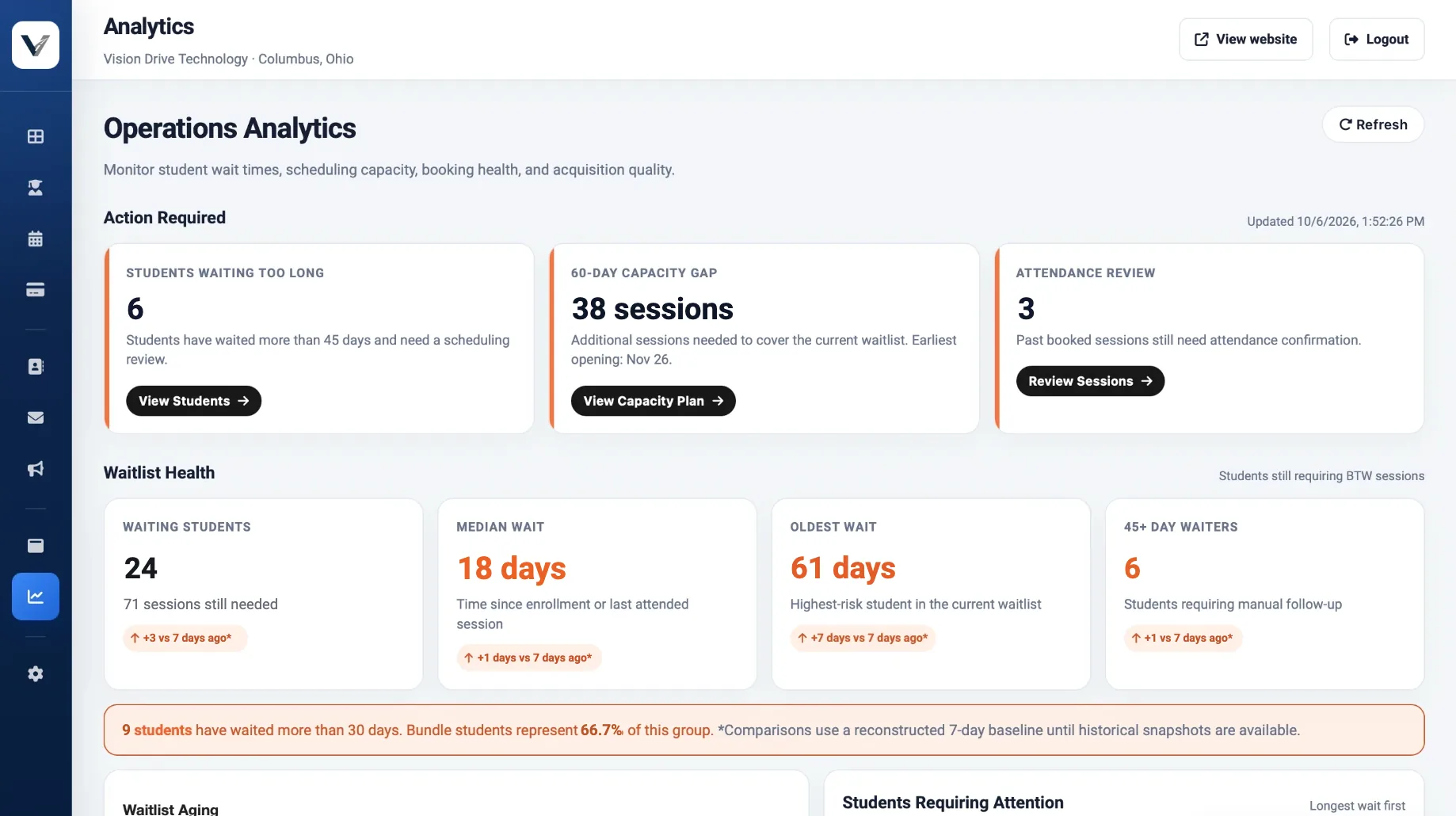
Analytics 8 / 9

Waitlist and capacity

Who is waiting, for how long, and how many sessions it takes to catch up.

Operations analytics showing students waiting too long, the 60-day capacity gap and waitlist health
  1. Action required

    Students waiting too long, the 60-day capacity gap and attendance to confirm.

  2. Waitlist health

    Median and oldest wait, compared with a week ago.

  3. Plain-language summary

    One sentence on who has waited more than 30 days.

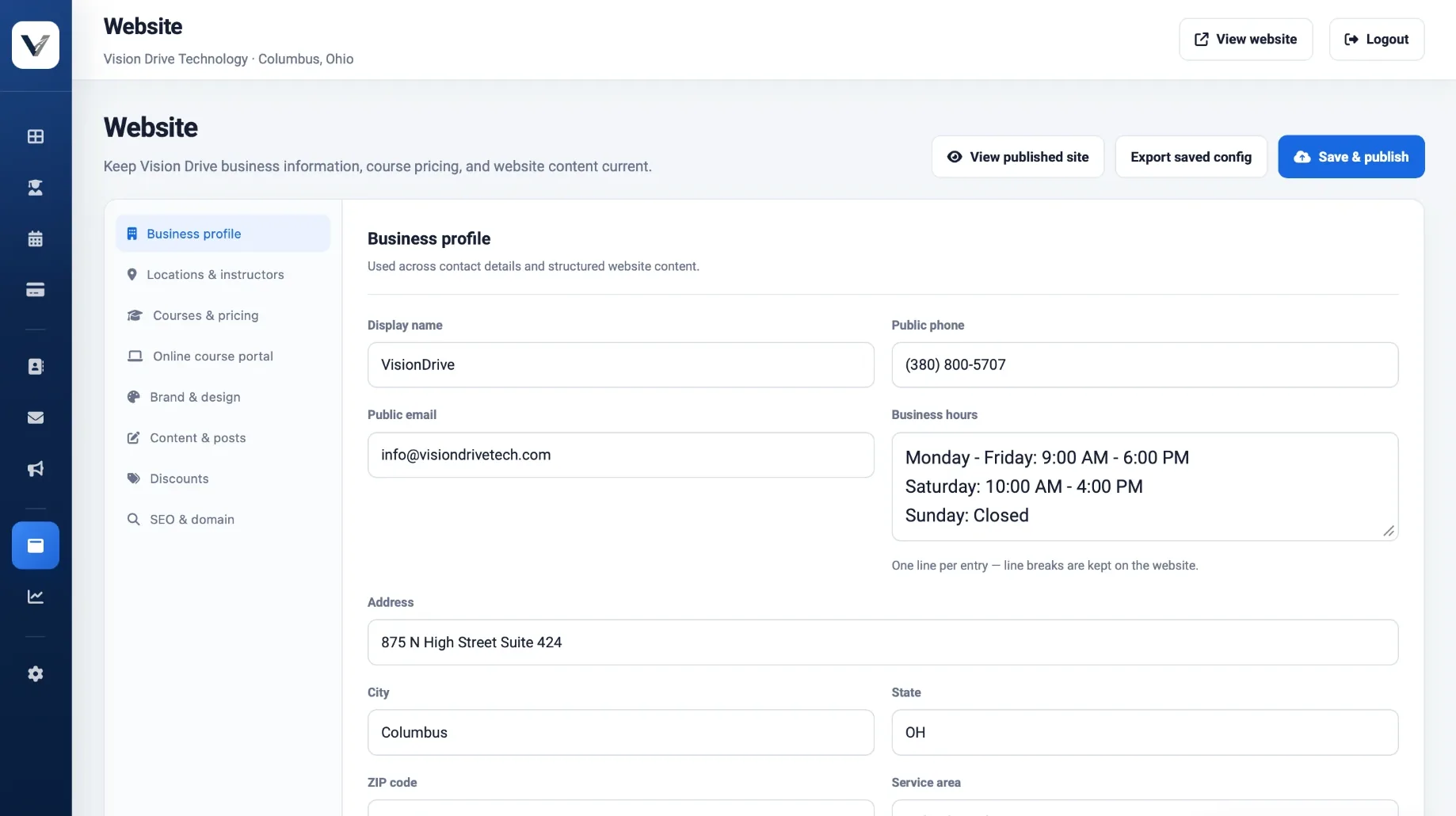
Website 9 / 9

Edit your website yourself

Business details, courses, prices and content, published without a developer.

Website editor with the business profile form and sections for courses, pricing, brand, content and SEO
  1. Business profile

    Name, phone, hours and address, used everywhere on the site.

  2. Courses and pricing

    Plus discounts, posts, brand colours and SEO in the same editor.

  3. Save and publish

    Changes go live on your site when you publish.

What it is

Four things a generic CRM will not give you

Purpose-built, not adapted

Behind-the-wheel booking stays blocked until the agreement, emergency contact and course certificate are on file. Instructor calendars, drive sheets, parent-then-student e-signature and completion records come standard.

The accounts that matter are yours

Stripe, PayPal, your domain, your texting number and your email-sending account are opened in your school's name, so your payment history, your web address and the number students text never belong to us. We run the hosting and database for you, at our cost. If you cancel, you leave with all of those accounts and a full export of your data.

No per-contact pricing

No per-student, per-contact or per-user fees on any package, and no limit on students, contacts or staff logins. Add instructors and students without the price moving.

Buyable outright

At any time while your account is current you can buy a perpetual licence to the version you run. We keep it online for as long as you want it, with security updates but not new features, and you owe nothing monthly beyond your own texting, email-sending and card-processing accounts. The buyout price depends on your package, and 50% of the build fee you have paid counts toward it. The source code is held with an independent escrow agent and released to you if we ever stop operating.

Four packages

Every package includes the website, hosting and support. They differ in how much of the student platform you get and how many locations and instructors it covers. We quote pricing on the walkthrough, for the package that fits your school.

SITEESSENTIALGROWTH (recommended)COMPLETE
Full student enrollment platform—IncludedIncludedIncluded
Website assistantAdd-onAdd-onIncludedIncluded
Courses listed in Google Shopping (product feed)—Add-onIncludedIncluded
Marketing-list sync—Add-onIncludedIncluded
Custom automations and conditional workflows——Add-onIncluded
Multiple locations——IncludedIncluded
Instructor calendars—2UnlimitedUnlimited
Included change hours per month1246
Build timeline3–7 days3–7 days3–7 days3–7 days
Students, contacts, staff loginsNo limitNo limitNo limitNo limit

Hosting and database are included: we run them and cover their cost. Your texting (Quo) and email sending (Resend, free until you outgrow it) are billed to you directly in accounts you own, along with card processing.

Start smaller and upgrade

Every dollar of build fee you have paid credits in full against the next package up, inside the window:

  • Site → Essential: within 6 months of launch
  • Essential → Growth: within 6 months of launch
  • Growth → Complete: within 12 months of launch
  • Essential → Complete (skipping Growth): within 6 months of launch

Add-ons

  • Website assistant on the Site or Essential package
  • Additional instructor calendar beyond two (Essential)
  • Unlimited instructor calendars (Essential)
  • Custom automations and conditional workflows on the Growth package
  • Geographic exclusivity, per 25-mile radius
  • Extra development or change work beyond included hours
  • Content migration from an existing site, CRM or spreadsheet

Get pricing for your school

We walk you through the platform and send a written quote for Site, Essential, Growth or Complete, with the build fee, monthly fee and buyout price.

Request a demo and quote

If you are also looking at an all-in-one automation platform

Several vendors pitch driving schools a "done-for-you automation platform" at $197 to $997 a month. Most are resold sub-accounts on a generic CRM. They are decent products for what they are, and they offer some extras we do not. Here is the comparison, including the places they win.

Resold all-in-one CRMVision Drive
What happens to your business asset
What the software actually isA sub-account on someone else's platformDriving-school software we host and run, with payments, domain and texting number in your name
If you cancelThe sub-account is switched off; site, funnels and automations go with itThe software stops, but you keep your domain, Stripe and PayPal accounts, texting number, email-sending account and a full data export
Can you ever own it outrightNoYes: a perpetual licence; we keep it running with security updates
Contact and user limitsEntry tier caps users and contacts; growth forces the upgradeNo caps on any package
Driving-school work a generic CRM cannot do
Student logs in to see progress, documents and lessonsNo student portalYes
Lesson booking blocked until prerequisites are on fileGeneric appointment bookingAgreement, emergency contact and course certificate checked before a lesson can be booked
Parent signs, then student signsGeneric e-signatureSequenced guardian-then-student flow built for minors
Per-lesson drive sheets with instructor sign-offNoYes, exportable
Completion certificates and recordsNoGenerated PDFs, records and CSV export
Time to go liveDays, from a generic template3–7 days, built around your courses
Money
Payment methodsCardsCards, bank debit (ACH), WeChat Pay, PayPal, and pay-over-time via Klarna and Afterpay
Processing cost on a $700 package~$20.60 on card$5.00 by bank debit, about $15.60 saved per enrollment
Lowest monthly planEntry tier, with no website and caps of 3 users and 2,000 contactsSite costs less, includes a full website and has no caps
Lowest setup feeEntry-tier setupSite costs less
Cheapest plan that includes a websiteTheir mid tier; the entry tier has no websiteSite, at well under half their mid-tier monthly fee
Full student platform, monthlyMid tier, with texting usage billed on topEssential costs less, even month to month and after your own texting and email accounts
Full student platform, setupMid-tier setup feeEssential costs less
Top tier, setup and monthlyEnterpriseComplete costs less on both
ContractNone; cancel anytimeMonth to month, or a lower rate on a 12-month term
Texting and email usageBilled on top of the platform feePaid to your own Quo and Resend accounts, at the vendor's price
Where they currently win, stated plainly
Lead pipeline with drag-and-drop stagesYes on the mid tierNot yet; contacts workspace and booking analytics instead
Social scheduling, directory listings, affiliate program, ad manager, voice AIYes or as add-onsNo, deliberately
Online course delivery inside the platformNoIn development, not in any package today

What this does not do

None of the following is built, so none of it is priced above, and no date is promised for any of it.

  • A drag-and-drop lead pipeline. You get the contacts workspace and booking analytics instead. A multi-touch review campaign is also absent: the review request goes out once, with the completion certificate.
  • Online course delivery inside the platform. In development. Today the platform captures the certificate number, stores the uploaded certificate, and blocks behind-the-wheel booking until it is on file. When delivery ships it is a paid add-on; you will still need to own or license a state-approved course.
  • A native iOS or Android app. The site is mobile-first and works well on a phone; an app-store build is a separate project.
  • Compliance work. No curriculum, instructor training, licensing or inspection support, electronic reporting or state filings, and no legal advice. We build the forms and records your training manager specifies; you own what the words say.
  • Texting consent. You are the sender of record. Consent, opt-outs, quiet hours and A2P/10DLC registration are in your name.

Three questions to ask every vendor, including us

  1. "Show me a student being blocked from booking a lesson because their certificate is not on file." The single most useful thing driving-school software does. Ask to watch it happen in the live system, not in a slide.Our answer: it is part of every walkthrough. Behind-the-wheel booking stays locked until the agreement, emergency contact and course certificate are all on file, and unlocks once the last one arrives. No one at the front desk has to check.
  2. "What do I have in three years if I stop paying?" On a rented sub-account, nothing, and you will have paid for all three years.Our answer: your domain, your Stripe and PayPal accounts, your texting number and your email-sending account were opened in your school's name from day one, so they stay with you, along with a full export of your data. To keep using the software without a monthly fee, buy the perpetual licence: we keep it running, with security updates, for as long as you want it.
  3. "What is my bill in month 13 at 2,500 contacts and five staff logins?" Entry tiers are priced around caps a busy school passes inside a year. Compare the tier you will actually be on.Our answer: contacts and staff logins do not change it. No package charges per student, per contact or per user, and none caps students, contacts or staff logins, so growing past 2,500 contacts or hiring a sixth instructor costs nothing extra.

Live walkthrough

See it working in 20 minutes

Not a slide deck. A screen share of the platform on synthetic demo data, never a real student's record. If it is not a fit, we will say so on the call.

  • A real enrollment, start to finish
  • A certificate blocking a booking
  • An instructor signing off a drive sheet
  • The admin portal from the tour above

Tell us about your school

Send a demo request and our team will contact you to arrange the walkthrough.

1Your school
2How we reach you
3A little context optional

We use these answers only to prepare the walkthrough, and demo requests are not added to any mailing list. Ohio is the jurisdiction currently encoded in the platform; schools elsewhere are welcome to ask, and we will say plainly what would need to change.

Package prices are subject to their stated validity period and superseded by any signed agreement. Feature descriptions reflect the platform as built; roadmap items create no obligation.